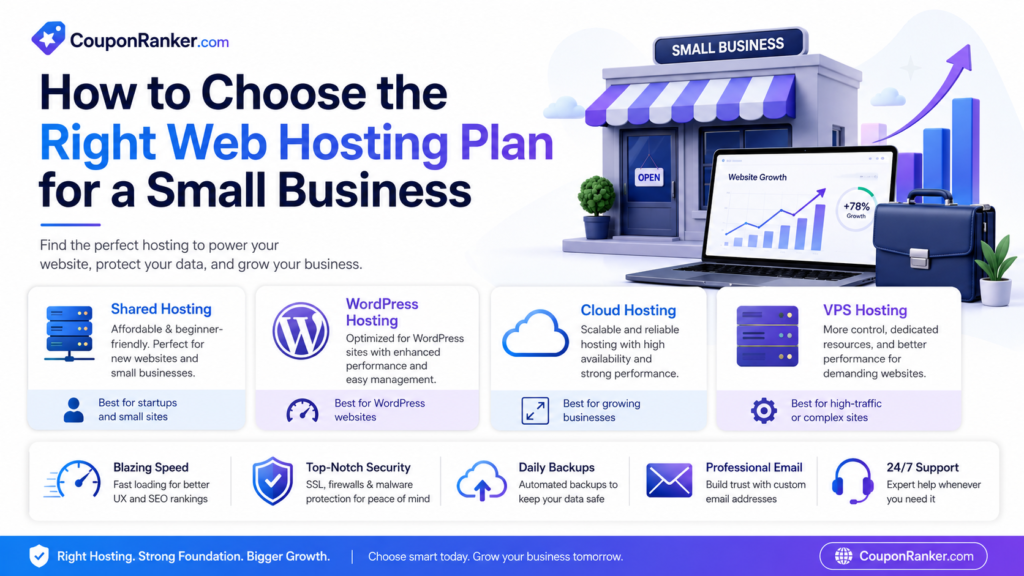
Choosing the right web hosting plan is one of the most important steps when building a small business website. Your hosting affects your website speed, uptime, security, customer experience, SEO performance, and even your sales. A good hosting plan can help your website load faster, stay online, and handle visitors smoothly. A poor hosting plan can make your site slow, unreliable, and difficult to manage.
For small businesses, the goal is not always to buy the most expensive hosting. The goal is to choose a hosting plan that matches your website type, traffic level, budget, security needs, and future growth. In this guide, we will explain how to choose the right web hosting plan for a small business, what features to look for, and which mistakes to avoid before buying hosting.
What Is Web Hosting?
Web hosting is the service that stores your website files and makes them available online. When someone types your website address into a browser, the hosting server delivers your website content to that visitor.
Every website needs hosting. Whether you are running a local service website, online store, restaurant website, blog, portfolio, booking website, or small business landing page, your hosting plan plays a major role in how your website performs.
Why Web Hosting Matters for Small Businesses
Small business websites need to create trust quickly. When a customer visits your website, they expect it to load fast, look professional, and work without errors. If the website is slow or keeps going offline, customers may leave and choose a competitor.
Good hosting helps your business by improving:
- Website speed
- Uptime and reliability
- Customer trust
- SEO performance
- Website security
- Backup protection
- User experience
- Future scalability
For a small business, your website is often the first impression. Choosing the right hosting plan helps you protect that impression.
Types of Web Hosting Plans
Before choosing a plan, it is important to understand the main types of hosting available.
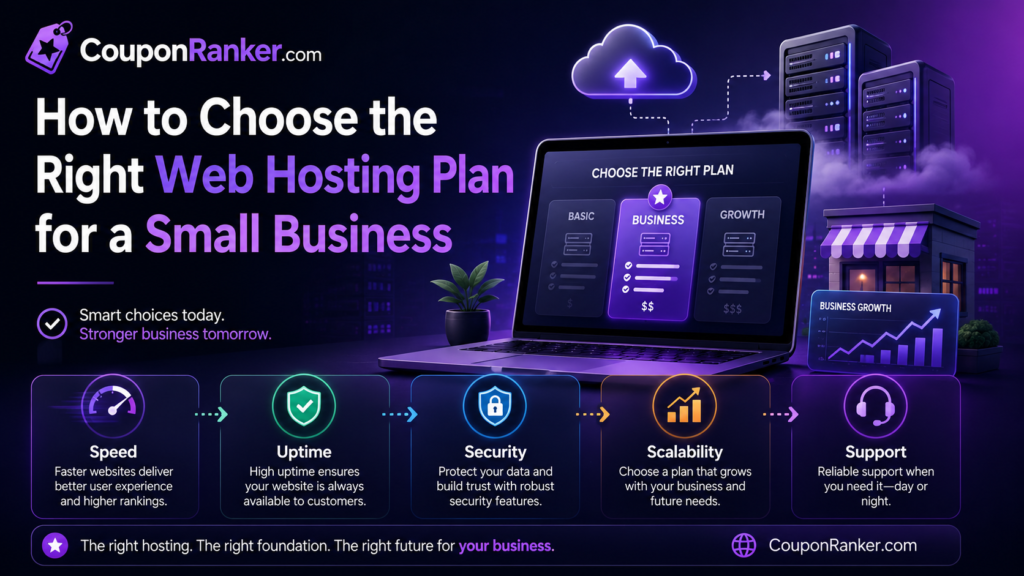
1. Shared Hosting
Shared hosting is usually the most affordable option. In shared hosting, multiple websites use the same server resources. This makes it budget-friendly and beginner-friendly.
Shared hosting is best for:
- New small business websites
- Blogs
- Portfolio websites
- Local service websites
- Simple company websites
- Low-traffic websites
Shared hosting is a good starting point if your website is new and does not receive heavy traffic. However, because server resources are shared, performance may be limited if your site grows or needs more power.
2. Managed WordPress Hosting
Managed WordPress hosting is designed specifically for WordPress websites. It usually includes WordPress installation, updates, caching, security tools, backups, and performance optimization.
Managed WordPress hosting is best for:
- WordPress business websites
- Blogs
- Affiliate websites
- Coupon websites
- Service-based business websites
- Content-focused websites
If your small business website is built on WordPress, managed WordPress hosting can save time and make website management easier.
3. VPS Hosting
VPS stands for Virtual Private Server. It gives your website more dedicated resources than shared hosting. VPS hosting is more powerful and flexible, but it can also require more technical knowledge.
VPS hosting is best for:
- Growing websites
- Higher-traffic websites
- Developers
- Custom applications
- Websites needing more control
- Businesses that need stronger performance
A VPS is useful when shared hosting becomes too limited, but it may not be necessary for a basic small business website.
4. Cloud Hosting
Cloud hosting uses multiple connected servers instead of relying on one physical server. It can offer better scalability, reliability, and performance.
Cloud hosting is best for:
- Growing businesses
- Ecommerce websites
- Websites with changing traffic
- Businesses needing better uptime
- Sites that may scale in the future
Cloud hosting is a strong option for small businesses that expect traffic growth or need more stable performance.
5. Dedicated Hosting
Dedicated hosting gives your website an entire server. It is powerful but expensive and usually unnecessary for most small businesses.
Dedicated hosting is best for:
- Large businesses
- High-traffic websites
- Enterprise projects
- Advanced ecommerce platforms
- Websites needing full server control
Most small businesses do not need dedicated hosting at the beginning.
How to Choose the Right Hosting Plan
1. Understand Your Website Type
The first step is to understand what kind of website you are building. A simple business website does not need the same hosting power as an online store.
For example, a local plumber, salon, restaurant, consultant, or small agency may only need a reliable shared or managed WordPress plan. But an ecommerce store with products, checkout, customer accounts, and payment processing may need stronger hosting with better security and backups.
Ask yourself:
- Is my website just informational?
- Will I sell products online?
- Will users create accounts?
- Will I publish many blog posts?
- Will I run ads or marketing campaigns?
- Will the website need booking or payment features?
The more complex your website is, the stronger your hosting plan should be.
2. Check Website Traffic Expectations
If your website is new, you may not need a high-end plan immediately. But if you already have traffic from social media, Google Ads, email marketing, or an existing customer base, you should choose a plan that can handle visitors smoothly.
For new websites, shared hosting or managed WordPress hosting is often enough. For growing websites, cloud hosting or VPS hosting may be better.
A good rule is simple: start with a plan that fits your current needs, but choose a hosting provider that allows easy upgrades.
3. Look for Good Uptime
Uptime means how often your website stays online. If your website goes down frequently, customers cannot reach your business. This can affect sales, leads, and trust.
Look for hosting providers that offer a strong uptime guarantee, ideally 99.9% or higher. Also check real user reviews and independent performance tests where possible.
For small businesses, uptime is especially important because even a short downtime during business hours can cost leads or sales.
4. Prioritize Website Speed
Website speed affects user experience and SEO. A slow website can frustrate visitors and reduce conversions. If your small business depends on online leads or sales, speed should be a top priority.
Look for hosting features such as:
- SSD or NVMe storage
- LiteSpeed or optimized web servers
- Built-in caching
- CDN support
- Server locations near your target audience
- Optimized WordPress performance
- Modern PHP support
For example, if your customers are mostly in the United States, choosing a server location close to that region can help improve loading time.
5. Choose Hosting With Free SSL
SSL protects data between your website and visitors. It also makes your website show as secure in browsers. A website without SSL can look unprofessional and unsafe.
Most good hosting providers now include free SSL certificates. For small businesses, this is essential. Whether your website is a simple business site or an ecommerce store, SSL should be included.
6. Check Backup Options
Backups are very important. If your website breaks, gets hacked, or loses data, backups help you restore it quickly.
Look for hosting that offers:
- Automatic backups
- Easy restore options
- Daily or weekly backup schedules
- Backup storage included in the plan
For a basic website, weekly backups may be acceptable. For ecommerce stores, booking websites, or websites that change daily, daily backups are better.
7. Consider Security Features
Security should not be ignored. Small business websites are often targeted because owners may not update plugins, themes, or passwords regularly.
Good hosting security features may include:
- Malware scanning
- Web application firewall
- DDoS protection
- Free SSL
- Automatic updates
- Secure file permissions
- Two-factor authentication
- Server monitoring
If you use WordPress, also choose trusted themes and plugins, keep everything updated, and avoid nulled or cracked software.
8. Look for Easy WordPress Installation
Many small business websites use WordPress because it is flexible and easy to manage. If you plan to use WordPress, choose a hosting provider that offers one-click WordPress installation or managed WordPress setup.
This saves time and helps beginners launch websites faster.
9. Check Customer Support
Good customer support is very important, especially if you are not technical. If your website goes down or you face an issue, fast support can save time and stress.
Look for:
- 24/7 support
- Live chat support
- Ticket support
- Good knowledge base
- WordPress support
- Clear response times
Before buying hosting, check reviews about customer support quality. Cheap hosting is not always worth it if support is poor.
10. Compare Storage and Bandwidth
Storage is the space your website uses for files, images, emails, databases, and backups. Bandwidth is the amount of data transferred when visitors use your website.
For a simple business website, basic storage is usually enough. But if your website has many images, videos, products, or downloadable files, you may need more storage and bandwidth.
Avoid plans that look cheap but have very low storage limits if your website will grow.
11. Check Email Hosting
Many small businesses need professional email addresses like info@yourbusiness.com or support@yourbusiness.com. Some hosting plans include email hosting, while others charge extra.
Before buying, check whether the plan includes:
- Business email accounts
- Email storage
- Webmail access
- SMTP support
- Spam protection
A professional email address improves trust and looks more serious than using a free Gmail or Yahoo address for business communication.
12. Review Renewal Pricing
Many hosting companies offer low introductory prices, but renewal prices can be higher. Before buying, always check both the first-term price and the renewal price.
Do not choose a plan only because the first price looks cheap. Calculate the long-term cost for one, two, or three years.
13. Check Upgrade Options
Your business may grow. Your website traffic may increase. You may add ecommerce, bookings, or more content later. That is why it is better to choose a hosting provider that allows easy upgrades.
A good hosting provider should let you move from shared hosting to cloud hosting, VPS, or higher plans without complicated migration.
14. Check Server Location
Server location affects speed. If your customers are mostly in one country, choose a server location close to that audience.
For example:
- USA audience: choose a USA data center
- UK audience: choose a UK or Europe data center
- Pakistan audience: choose Asia, Middle East, or nearby region if available
- Global audience: use CDN support
For international visitors, a CDN can help deliver content faster across different locations.
15. Consider Ecommerce Requirements
If your small business sells products online, hosting becomes even more important. Ecommerce websites need better speed, security, backups, and reliability.
For ecommerce, look for:
- SSL included
- Daily backups
- Strong security
- Good uptime
- Fast performance
- Scalable resources
- PCI-friendly environment
- Reliable support
- Easy restore options
If your store gets regular orders, avoid very cheap low-resource hosting. A slow checkout page can hurt sales.
Best Hosting Plan by Small Business Type
Local Service Business
Examples: plumber, electrician, salon, clinic, repair service, cleaning company.
Best option: Shared hosting or managed WordPress hosting.
Reason: These websites usually need service pages, contact forms, location pages, and basic blog content.
Small Online Store
Examples: clothing store, handmade products, digital goods, small ecommerce shop.
Best option: Managed WordPress hosting, WooCommerce hosting, or cloud hosting.
Reason: Online stores need better speed, security, checkout reliability, and backups.
Blog or Affiliate Website
Examples: review blog, coupon website, niche blog, content website.
Best option: Managed WordPress hosting or cloud hosting.
Reason: These websites need fast loading, SEO-friendly performance, caching, and easy content management.
Agency or Portfolio Website
Examples: designer, freelancer, photographer, marketing agency.
Best option: Shared hosting or managed WordPress hosting.
Reason: A portfolio website usually needs good speed, image optimization, and professional email.
Growing Business Website
Examples: business getting traffic from ads, SEO, or social media.
Best option: Cloud hosting or VPS hosting.
Reason: Growing websites need more resources, better stability, and easier scaling.
Common Hosting Mistakes to Avoid
Choosing Only the Cheapest Plan
Cheap hosting can be useful at the beginning, but the cheapest plan may have limited performance, storage, backups, or support. Always compare features, not only price.
Ignoring Renewal Cost
Introductory prices can be low, but renewals may cost more. Always check renewal pricing before buying.
Buying More Than You Need
Some beginners buy expensive VPS or dedicated hosting when a simple managed WordPress plan would be enough. Start with what you need and upgrade later.
Ignoring Backups
Many website owners only think about backups after something goes wrong. Choose hosting with automatic backups from the beginning.
Not Checking Support Quality
Bad support can create serious problems when your website has an issue. Choose hosting with reliable support and helpful documentation.
Forgetting About Security
SSL, malware protection, updates, and backups are not optional. They are important for every business website.
Final Checklist Before Buying Hosting
Before choosing a web hosting plan for your small business, check these points:
- Does the plan fit your website type?
- Is it suitable for your expected traffic?
- Does it include free SSL?
- Are backups included?
- Is customer support available 24/7?
- Does it support WordPress if needed?
- Is the server location close to your audience?
- Does it offer good uptime?
- Are security features included?
- Is the renewal price affordable?
- Can you upgrade later?
- Does it include business email?
- Is CDN support available?
- Is the dashboard beginner-friendly?
If the answer is yes to most of these questions, the hosting plan may be a good choice.
Final Verdict
The right web hosting plan for a small business depends on your website goals, budget, traffic, and technical needs. For most new small business websites, shared hosting or managed WordPress hosting is a good starting point. For ecommerce stores and growing websites, cloud hosting or VPS hosting may be a better long-term choice.
Do not choose hosting only because it is cheap. Look at speed, uptime, security, backups, support, renewal pricing, and upgrade options. A good hosting plan helps your small business website stay fast, secure, and reliable as your business grows.
Before buying any hosting plan, compare features carefully and choose the one that gives your business the best balance of performance, price, and long-term value.
Frequently Asked Questions
What is the best hosting plan for a small business?
For most small businesses, managed WordPress hosting or shared hosting is enough at the beginning. If your website gets more traffic or runs an online store, cloud hosting may be a better option.
Is shared hosting good for a small business?
Yes, shared hosting can be good for a new small business website with low traffic. However, if your website grows or needs better performance, you may need to upgrade.
Do I need VPS hosting for my small business?
Not always. VPS hosting is useful for growing websites, custom applications, or higher traffic. A simple business website usually does not need VPS hosting at the start.
Is cloud hosting better than shared hosting?
Cloud hosting is usually more scalable and reliable than shared hosting. It is better for growing businesses, ecommerce websites, and websites that need stronger performance.
How much storage does a small business website need?
A basic small business website may not need much storage. However, websites with many images, videos, products, or backups may need more space.
Should my hosting plan include email?
Yes, business email is useful for professionalism. A branded email address like info@yourbusiness.com looks more trustworthy than a free personal email address.
Is SSL necessary for a small business website?
Yes, SSL is necessary for security and trust. Every small business website should use SSL, especially if it has forms, login pages, or payment options.
Can I upgrade my hosting later?
Yes, most good hosting providers allow upgrades. It is smart to start with a suitable plan and upgrade when your traffic or business needs grow.
